Theme: Cyber Security and Encryption
Engine: MonoGame (XNA)
Platform: PC
Time Worked: 28 May 2020 - 03 June 2020 (7 Days)
Aim
To build a simulation of an Enigma Machine from scratch, using C#, in order to keep my skills up in a second programming language other than C++.
Description
This project’s 1.0 version was completed in six days as a way to stretch my programming muscles after an increase in my work commitments for my retail job. The idea for this project was inspired by my research into cyber security and encryption. The application simulates an Enigma Machine from World War II (https://en.wikipedia.org/wiki/Enigma_machine), which is a very early form of encryption used by the Germans to send coded messages during the war.
Work Completed
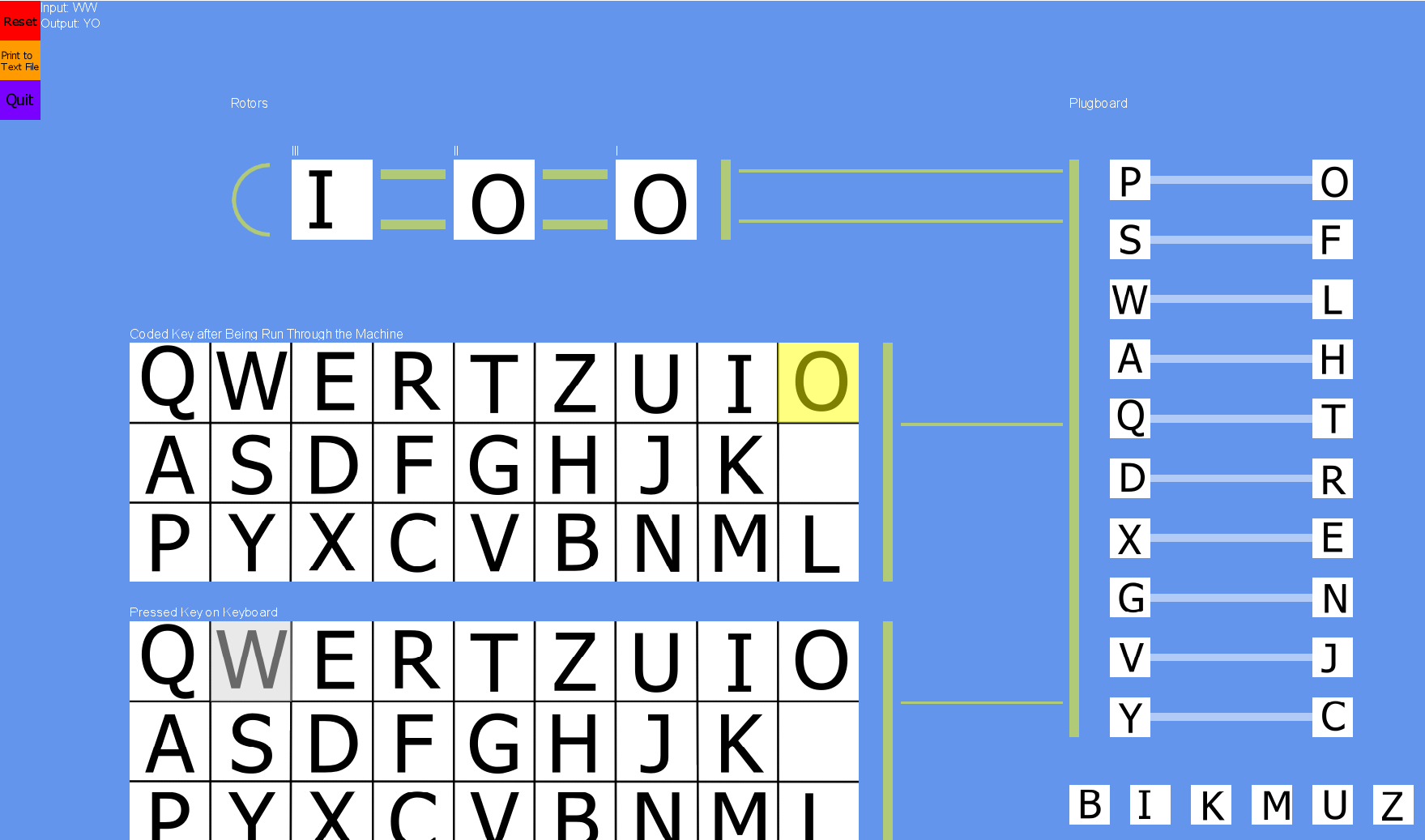
The Enigma Machine is broken up into four parts: the keyboard, the plugboard, the rotors, and the lightup display. When pressing a letter on the keyboard, it simulates the path of the letter through the machine (originally used by electrical wiring in the original machines). The letter goes to the Plugboard, which switches 10 of the 26 letters with another 10 of the 26 letters. The letter returned from the Plugboard is then passed to the three rotors. Each rotor has each of the 26 letters connected to another of the 26 letters, and is also turned in place to one of 26 positions. After each letter is pressed, Rotor I rotates one place (which means if the same letter is pressed multiple times in a row, it will not code to the same letter – eg, if ‘HHH’ is entered, it may come out as ‘QLT’). If Rotor I reaches back to position ‘A’, Rotor II rotates one place, and if Rotor II reaches back to position ‘A’, Rotor III rotates one place. The letter is then passed to the Reflector, which also has 13 letters connected to the 13 other letters, meaning there will be no one for one switch of the same letter (eg, ‘H’ is not switched for ‘H’). The letter is then passed back through the rotors, back through the Plugboard, and to the lightup display, which lights up the coded letter. If the Enigma Machine is set back to its starting specs (with the rotor positions and switches in the Plugboard), and the coded message is entered, the original message will light up.
My application’s 1.0 iteration simulates this path. It also allows for a user to manually change the rotor positions and Plugboard switches (in order to reset and decode the message). The application also prints both the coded and decoded message to show the simulations. There is also an implemented feature where the starting specs, coded messages, and decoded messages can be saved to .txt files for both readability and to be able to be passed to someone else to decode.
Stretch Goals to be Completed
While the project’s first iteration is complete, it is still my intention to return and complete the stretch goals set for the project one day, as follows:
- Add networking so that coded messages can be sent across the internet to be decoded elsewhere
- Fix the Programmer Art (to make the UI look professional)

 Aythan Maconachie